
Tracking SEO leads means connecting organic website traffic with actual enquiries, qualified prospects, and sales. At Soureep AI SEO Leads, we help businesses measure more than rankings and website visits by tracking the complete journey from Google search to final conversion.
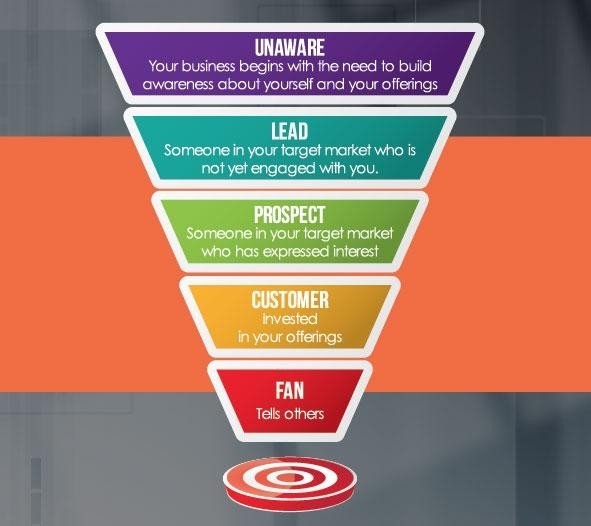
A Clear SEO Lead Tracking Process
Follow these six steps to understand how SEO contributes to business growth:
- Track Organic Traffic: Connect Google Search Console and GA4 to identify organic search queries, clicks, landing pages, and visitor behaviour.
- Monitor Lead Enquiries: Set up conversion tracking for contact forms, phone calls, WhatsApp clicks, consultation bookings, and quote requests.
- Capture Lead Sources: Record the original traffic source, landing page, campaign details, and enquiry date through form tracking and hidden fields.
- Connect Leads to CRM: Send enquiry details to your CRM and track each lead through stages such as New Lead, Contacted, Qualified, Proposal Sent, and Closed.
- Measure Sales Performance: Identify which organic leads become customers and calculate conversion rates, revenue, and cost per lead.
- Optimise SEO Campaigns: Analyse high-performing keywords and landing pages, improve conversion opportunities, and focus on attracting more qualified prospects.
Key Metrics to Measure
- Organic traffic and keyword performance.
- Total enquiries from SEO.
- Qualified leads and sales conversions.
- Lead-to-customer conversion rate.
- Revenue generated from organic search.
- SEO cost per lead and overall ROI.
With this structured approach, Soureep AI SEO Leads helps businesses turn organic search traffic into qualified enquiries, track leads through the sales pipeline, and measure real business growth.
How to Track Leads from SEO to Sales
Tracking leads from SEO to sales helps businesses understand which keywords, landing pages and campaigns generate genuine enquiries and customers. At Soureep AI SEO Leads, we recommend a structured tracking system that connects organic traffic with your sales pipeline.
Recommended Lead Tracking Tools
- Google Analytics 4 (GA4): Track organic visitors, landing pages, user behaviour and lead conversion events.
- Google Search Console: Monitor organic clicks, impressions, search queries, keyword positions and landing-page performance.
- Google Tag Manager (GTM): Set up and manage tracking tags for form submissions, phone clicks, WhatsApp clicks and other important actions.
- CRM Software: Tools such as HubSpot or Zoho CRM help manage enquiries, track follow-ups and monitor lead status through the sales pipeline.
- Call and WhatsApp Tracking: Track calls and WhatsApp enquiries using suitable tracking integrations or dedicated tracking numbers where available.
- Looker Studio: Create performance dashboards by combining GA4, Search Console and CRM reporting data.
Step-by-Step Lead Tracking Setup
Step 1: Install Google Analytics 4
Create a GA4 property and add its tracking tag to your website using Google Tag Manager or your website integration. Verify that website visits and traffic sources are being recorded correctly.
Step 2: Connect Google Search Console
Verify your website in Google Search Console and connect it with GA4 where appropriate. Use Search Console to identify the search queries, pages and organic clicks bringing visitors to your website.
Step 3: Configure Google Tag Manager
Install the GTM container on your website. Configure tracking for important actions, including:
- Contact form submissions
- Phone number clicks
- WhatsApp button clicks
- Appointment bookings
- Quote requests
Test each event before marking relevant actions as conversions in GA4.
Step 4: Connect Your CRM
Integrate your website forms with a CRM such as HubSpot or Zoho CRM. Capture useful information for every enquiry:
- Lead name and contact details
- Original traffic source
- Landing page
- Campaign or keyword information, where available
- Enquiry date and lead status
Step 5: Track Leads Through the Sales Pipeline
Create clear CRM stages to monitor lead progress:
New Enquiry → Contacted → Qualified → Proposal Sent → Converted / Lost.
Record sales outcomes so you can identify which SEO landing pages and traffic sources generate paying customers.
Step 6: Build a Performance Dashboard
Use Looker Studio, GA4 and CRM reports to monitor:
- Organic traffic and search performance
- Total SEO enquiries
- Qualified leads
- Lead-to-customer conversion rate
- Revenue generated from organic leads
- Cost per lead and SEO campaign ROI
How the Tracking System Works
Google Search Console identifies search performance → GA4 measures website traffic and conversions → GTM tracks important user actions → CRM manages enquiries and sales → Looker Studio reports overall performance.
Important: GA4 does not automatically identify every lead’s eventual sales outcome. Connect CRM records with original source information using suitable integrations, hidden form fields or offline conversion imports to measure the complete journey.
With the right tracking setup, Soureep AI SEO Leads helps businesses move beyond measuring website traffic and focus on qualified enquiries, sales conversions and measurable business growth.